
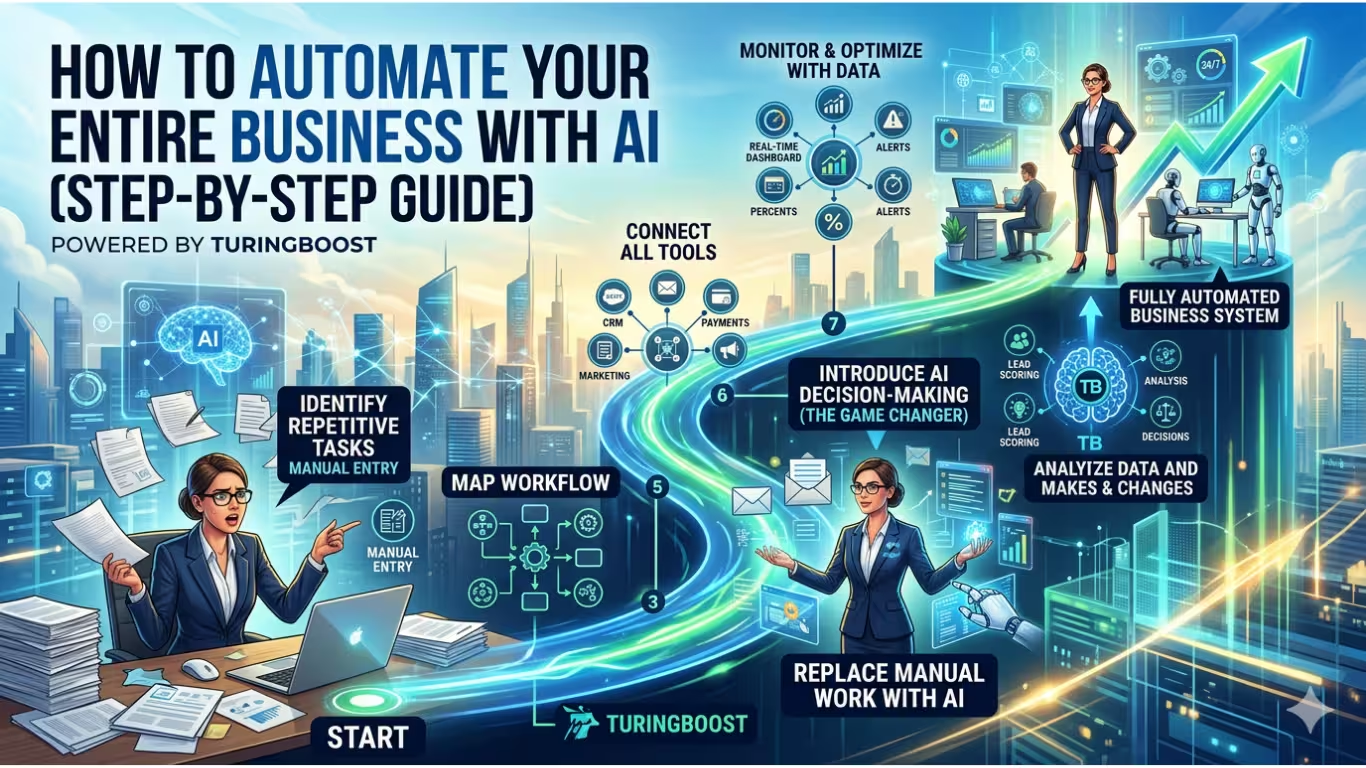
The $10 Trillion Question
Here’s a sobering statistic: 67% of businesses still perform repetitive tasks manually that software could handle autonomously. While you’re copy-pasting data between spreadsheets, your competitors are operating 24/7 with AI agents that never sleep, never miss a follow-up, and never forget to log a call.
Manual work is no longer just inefficient—it’s a competitive disadvantage.
But here’s what most “automation guides” get wrong: they teach you to connect apps with simple triggers. That’s 2020 thinking. We’re living through the most significant shift in business operations since the internet itself—the transition from RPA (Robotic Process Automation) to Agentic AI.
Zapier connected your apps. AI agents run your operations.
This isn’t another listicle of tools. You’ll get a complete strategic framework to build a self-running business system—whether you use TuringBoost or not—plus exactly how TuringBoost executes this vision faster than legacy platforms.
By the end: You’ll understand how to move from doing work, to managing workflows, to orchestrating intelligent systems that improve themselves.
The Pre-Automation Audit: Before You Touch a Tool
You can’t automate chaos. Before building anything, you need to assess your automation readiness across three dimensions: data hygiene, process clarity, and integration capability.
The Automation Matrix
Categorize every recurring task in your business using this framework:Table
| Volume | Complexity | Strategy | Example |
|---|---|---|---|
| High | Low | Automate First | Data entry, scheduling, status updates |
| High | High | Deploy AI Agents | Lead qualification, support triage, content personalization |
| Low | High Stakes | Human-in-the-Loop | Contract negotiations, executive escalations, strategic decisions |
| Low | Low | Eliminate or Delegate | One-off reports, infrequent manual checks |
The 80/20 Rule: 80% of your time savings will come from automating the top 20% of high-volume, low-complexity tasks. Start there.
The Data Hygiene Checklist
AI is only as smart as the data you feed it. Before integration:
- [ ] Standardization: Are customer records formatted consistently? (No “John Doe,” “Doe, John,” and “J. Doe” as separate entries)
- [ ] API Availability: Do your critical tools have open APIs or webhooks?
- [ ] Decision Documentation: Are your business rules written down, or trapped in employees’ heads?
- [ ] Data Flow Mapping: Do you understand how information moves between departments?
Reality Check: If your CRM is a mess, automating it just spreads the mess faster. Clean first, automate second.
[Download: The Automation Potential Scorecard →]
A 10-question diagnostic to identify your highest-ROI automation opportunities.
Step 1: Map Your Value Chain, Not Just Tasks
The Old Way: “Let’s automate email follow-ups.”
The Strategic Way: Map the complete customer lifecycle and identify where friction kills revenue.
The End-to-End Business Flow
plain
Copy
Lead Capture → Qualification → Nurture → Conversion → Onboarding → Retention → Advocacy
     ↓              ↓            ↓           ↓            ↓            ↓           ↓
   Forms       AI Scoring    Personal    Payment    Activation   Health      Referral
   Ads         Enrichment    Sequences   Signing    Setup        Checks      Loop
   Events      Routing       Demos       Invoicing  Training     Upsells     Reviews
Action: For each stage, ask:
- Where do leads/customers get stuck waiting for human action?
- Where do errors typically occur?
- Where do we lose visibility into what’s happening?
These friction points are your automation goldmines.
Step 2: Build the Intelligent Layer
This is where most automation strategies fail. They stop at connection when they should push toward cognition.
Rules vs. Intelligence
Table
| Traditional Automation | AI-Powered System |
|---|---|
| “If form submitted, send email” | “If form submitted, analyze company size, intent signals, and past behavior → route hot leads to sales instantly, nurture cold leads with personalized content → adjust messaging based on engagement → alert team if response time risks conversion” |
| Static, linear | Dynamic, adaptive |
| Reacts | Decides |
The TuringBoost Difference: While platforms like Zapier excel at “If X, then Y,” TuringBoost adds a decision layer that handles “If X, analyze context → predict outcome → decide action → execute → learn from result.”
Example in Practice:
A prospect downloads your pricing guide.
- Basic Automation: Add to email sequence. Wait 3 days. Send follow-up.
- Intelligent System: AI analyzes the company domain, enriches with LinkedIn data, checks if similar companies converted, scores intent, and either:
- High intent: Alerts sales rep with talking points within 5 minutes
- Medium intent: Enters personalized nurture with case studies from their industry
- Low intent: Adds to long-term education sequence, flags for re-engagement in 90 days
The system learns which signals actually predict conversion and adjusts its scoring model automatically.
Step 3: Deploy AI Agents for Specific Functions
AI agents are autonomous software entities that handle end-to-end workflows, not just single tasks. They perceive, decide, and act within guardrails you define.
The Three Core Business Agents
1. The Inbound Agent (Sales)
Function: Qualifies and routes leads without human screening.
Workflow:
- Monitors all lead sources (forms, chat, email, social)
- Enriches data with third-party sources (Clearbit, LinkedIn)
- Scores against your ideal customer profile using historical conversion data
- Routes hot leads to available reps with context brief
- Auto-schedules demos or sends resources to nurture leads
- Updates CRM and notifies marketing of lead quality
Result: Zero lead response time. Perfect lead data. No manual data entry.
2. The Support Agent (Customer Success)
Function: Resolves or escalates tickets intelligently.
Capabilities:
- Answers FAQs using your knowledge base
- Processes refunds/returns under defined thresholds
- Detects sentiment and urgency, prioritizing frustrated customers
- Escalates to humans with full context when complexity exceeds confidence score
- Suggests solutions to agents in real-time for faster resolution
Result: 24/7 first response. Consistent policy application. Human agents focus on relationship-building, not password resets.
3. The Operations Agent (Business Intelligence)
Function: Monitors systems and optimizes performance autonomously.
Responsibilities:
- Tracks workflow performance and detects bottlenecks
- Identifies failed processes and triggers self-healing protocols
- Monitors data quality and flags anomalies
- Generates and distributes reports without prompting
- Suggests workflow optimizations based on pattern recognition
Result: Your systems improve themselves while you sleep.
Human-in-the-Loop: The Trust Layer
Not everything should be fully autonomous. Define approval gates where AI pauses for human input:Table
| Scenario | AI Action | Human Role |
|---|---|---|
| Refund request <$100 | Auto-process | None |
| Refund request $100-$500 | Process with manager notification | Review weekly batch |
| Refund request >$500 | Prepare recommendation | Approve/deny |
| Contract cancellation | Analyze risk, prepare retention offer | Approve offer terms |
| Discount >20% | Flag for review | Sales manager approval |
This balance ensures speed without sacrificing judgment on high-stakes decisions.
Step 4: Integrate Your Stack Intelligently
Most businesses suffer from tool sprawl: 15+ apps that don’t talk to each other, creating data silos and manual bridges.
The Central Nervous System Architecture
TuringBoost functions as the orchestration layer above your existing infrastructure:
plain
Copy
                    [TuringBoost AI Core]
                           |
        -----------------------------------------
        |              |              |         |
   [Data Layer]  [Action Layer]  [Comm Layer]  [AI Layer]
        |              |              |         |
      CRM           Payments       Email      LLM/Agents
      Database      Documents      Slack      Analytics
      Warehouse     Scheduling     SMS        Prediction
Integration Priority Order:
- Data Sources (CRM, database, data warehouse) — The foundation of intelligent decisions
- Communication Channels (Email, Slack, SMS, chat) — Where AI interacts with humans
- Action Systems (Payment processors, document generators, scheduling tools) — Where AI executes
The Legacy System Challenge:
Not every tool has a modern API. TuringBoost handles this through:
- Browser Automation: For web-based apps without APIs
- Webhook Bridges: Converting email notifications or file drops into structured data
- Middleware Connectors: Pre-built adapters for common legacy systems
Step 5: Implement Continuous Intelligence
Automation without measurement is expensive guessing. You need observability into both technical performance and business outcomes.
The Real-Time Command Center
Workflow Metrics:
- Velocity: Time from trigger to completion across entire workflows
- Reliability: Success rate of automated steps, retry frequency
- Efficiency: Cost per automated transaction vs. manual equivalent
Business Metrics:
- Response Time: Lead follow-up speed, support ticket resolution
- Conversion Impact: Automated vs. manual nurture sequence performance
- Quality Score: Error rates, customer satisfaction, decision accuracy
AI Performance Metrics:
- Decision Accuracy: Rate of AI choices that humans would confirm
- Override Rate: How often humans reverse AI decisions (indicates calibration needs)
- Learning Velocity: Improvement in prediction accuracy over time
Self-Healing Workflows
TuringBoost doesn’t just report failures—it responds to them:Table
| Failure Type | Self-Healing Response |
|---|---|
| API timeout | Exponential backoff retry → fallback to queue → human alert if persistent |
| Data format change | Pattern matching adjustment → confidence scoring → flag for review if uncertain |
| Rate limiting | Queue management → load balancing across time windows |
| Authentication expiry | Secure credential refresh → audit log entry → admin notification |
Step 6: Scale to Full Business Automation
The end state isn’t a collection of automations—it’s a self-running business system where you manage outcomes and exceptions, not tasks and tools.
The Fully Automated Business Model
Table
| Business Function | Traditional Operation | AI-Automated Operation |
|---|---|---|
| Lead Generation | Manual outreach, list buying | AI prospecting with personalized messaging at scale |
| Sales Qualification | Rep-led discovery calls | AI scoring and automated demo scheduling |
| Customer Support | Ticket queues, shift coverage | Instant resolution, proactive escalation |
| Operations | Spreadsheet tracking, status meetings | Real-time system orchestration, exception-based management |
| Reporting | Monthly manual compilation | Live predictive analytics, anomaly alerts |
| Optimization | Quarterly business reviews | Continuous A/B testing, automatic implementation of winners |
The Role Shift
Table
| Level | Your Focus | Time Allocation |
|---|---|---|
| Manual | Doing tasks | 80% execution, 20% strategy |
| Automated | Managing workflows | 50% oversight, 50% improvement |
| Intelligent | Orchestrating systems | 20% exception handling, 80% growth initiatives |
Industry-Specific Automation Blueprints
E-Commerce
The Challenge: Inventory sync errors, support ticket backlogs, cart abandonment.
The Solution:
- Real-time inventory synchronization across Amazon, Shopify, and retail POS
- Dynamic pricing engine adjusting to competitor moves and demand signals
- Automated returns processing with fraud detection
- Abandoned cart recovery with AI-generated personalized incentives
Professional Services (Agencies, Consultancies)
The Challenge: Client onboarding friction, time tracking gaps, project visibility.
The Solution:
- Automated client intake with conflict checking and proposal generation
- Passive time capture from calendar, email, and document activity
- Project status dashboards updated automatically from task completion
- Automated invoicing with payment tracking and gentle escalation
SaaS Companies
The Challenge: Trial-to-paid conversion, churn prediction, compliance overhead.
The Solution:
- Trial user behavior analysis triggering personalized nurture sequences
- Churn prediction models flagging at-risk accounts for proactive outreach
- Automated security compliance reporting (SOC 2, GDPR)
- Usage-based upsell recommendations delivered at optimal moments
The Automation Anti-Patterns: What to Avoid
Even with powerful tools, automation can backfire. Here are the failure modes we see most often:
1. Automating Broken Processes
The Mistake: Speeding up a workflow that shouldn’t exist.
The Fix: Map the process first. Eliminate steps before automating them. Ask: “If we were starting fresh, would we do it this way?”
2. The Black Box Syndrome
The Mistake: AI makes decisions without transparency or audit trails.
The Fix: Require explainability. Every AI decision should be traceable to specific data points and confidence scores.
3. Set-and-Forget Mentality
The Mistake: Launching automation and never revisiting it.
The Fix: Monthly optimization reviews. Business conditions change; your automation should adapt.
4. Over-Automation
The Mistake: Removing human touch from high-value relationship moments.
The Fix: Define “sacred” touchpoints where human involvement is mandatory (e.g., executive onboarding, escalations from VIP accounts).
5. Tool Sprawl
The Mistake: Adding more tools to solve integration problems, creating more complexity.
The Fix: Centralize on one orchestration platform. TuringBoost integrates with 200+ tools specifically to avoid this trap.
TuringBoost vs. The Market: A Direct Comparison
Table
| Capability | Zapier/Make | Traditional RPA | TuringBoost |
|---|---|---|---|
| Trigger-based automation | ✅ | ✅ | ✅ |
| Visual workflow builder | ✅ | ⚠️ Complex | ✅ Intuitive |
| 200+ native integrations | ✅ | ❌ | ✅ |
| AI decision-making | ❌ Rule-based only | ❌ | ✅ Native LLM integration |
| Self-healing workflows | ❌ | ❌ | ✅ Auto-retry & fallback |
| Real-time optimization | ❌ | ❌ | ✅ Continuous improvement |
| AI agent deployment | ❌ | ⚠️ Requires dev team | ✅ No-code agents |
| Predictive analytics | ❌ | ❌ | ✅ Built-in |
| Human-in-the-loop controls | ❌ | ⚠️ | ✅ Granular approval gates |
The Verdict: Traditional tools connect. TuringBoost operates.
ROI Framework: What to Expect
Automation ROI follows a predictable curve. Set expectations accordingly:
30 Days: Quick Wins
- Email automation, basic lead routing, calendar scheduling
- Metric: 5-10 hours saved weekly per automated role
- Focus: Proving value, building team confidence
90 Days: Intelligent Systems
- AI agents handling qualification, support triage, data enrichment
- Metric: 30% faster lead response time, 20% operational cost reduction
- Focus: Expanding use cases, refining AI training
6 Months: Self-Optimizing Business
- Predictive analytics, autonomous decision-making, continuous improvement
- Metric: 2-3x operational leverage (same team, triple output)
- Focus: Strategic growth, market expansion
Conclusion: The Self-Running Business Is Here
The companies that dominate the next decade won’t be the ones with the most employees—they’ll be the ones with the most intelligent systems.
This shift isn’t about replacing humans. It’s about elevating humans from routine execution to creative strategy, from data entry to decision-making, from reactive firefighting to proactive growth.
Your immediate next steps:
- [Download the Automation Scorecard] — Identify your highest-ROI opportunities
- Audit one workflow using the Value Chain method outlined in Step 1
- Deploy your first AI agent with TuringBoost’s no-code platform
The competitive moat isn’t automation anymore. Everyone can connect apps. The advantage is how intelligently you automate—how much cognition you embed in your systems, how continuously they improve, and how effectively they free your people to focus on what matters.
The self-running business isn’t science fiction. It’s available today.
Start Building Your AI Business System
Ready to stop managing tasks and start managing outcomes?
TuringBoost gives you everything to automate intelligently:
- Visual workflow builder with native AI decision nodes
- Pre-trained agents for sales, support, and operations
- Real-time optimization and self-healing capabilities
- Enterprise security with granular human-in-the-loop controls
- 200+ integrations connecting your entire stack
[Start Your Free Automation Audit →]
Join 500+ companies already running on AI. Setup takes 15 minutes. No credit card required.
One thought on “How to Automate Your Entire Business with AI (Step-by-Step Guide)”